Job App Assistant.
Building the back room.
From scratch.
A working AI web application: designed, coded, and deployed in a single session. Not a prototype. Not a Figma file. A live product with a real URL, a real server, and a real API key that never once appeared in the wrong place.
I didn't know what happened after the click.
I've been designing AI-powered products for three years. TaskGPT. Generative workflows. Claude as a design collaborator. But if you'd asked me what actually happens when a user clicks Generate on an AI tool, not conceptually, but at every literal step, I couldn't have told you.
I knew there was a server. I knew there was an API key. I knew there was something called a backend. But where the key lived, why it couldn't live in the browser, what was actually running on the other end; I had no picture of it.
For a designer who works at the intersection of human judgement and AI tools, that felt like a gap worth closing. Not by reading. By building.
"The concepts are learnable. The plumbing just needs to become visible once."
It's a print shop. Once you see it, you can't unsee it.
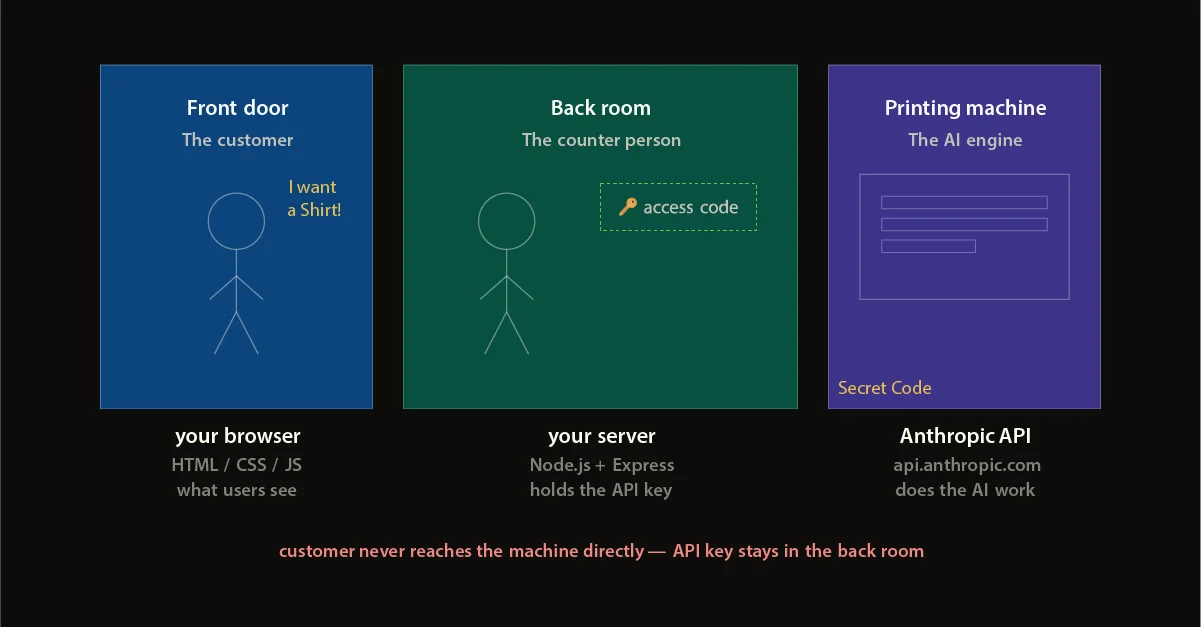
Before writing a single line of code, I needed an analogy that made the architecture legible. Imagine a print shop. A customer walks in through the front door, places an order. The counter person takes it to the back room, uses the machine, brings the shirt back out. The customer never touches the machine. They never see the access code to the back room.
In an AI web app: the front door is the browser: what the user sees and touches. The back room is the server: a programme running somewhere, always on. The machine is the AI API: doing the actual work. The access code is the API key: the secret that proves you're allowed in.
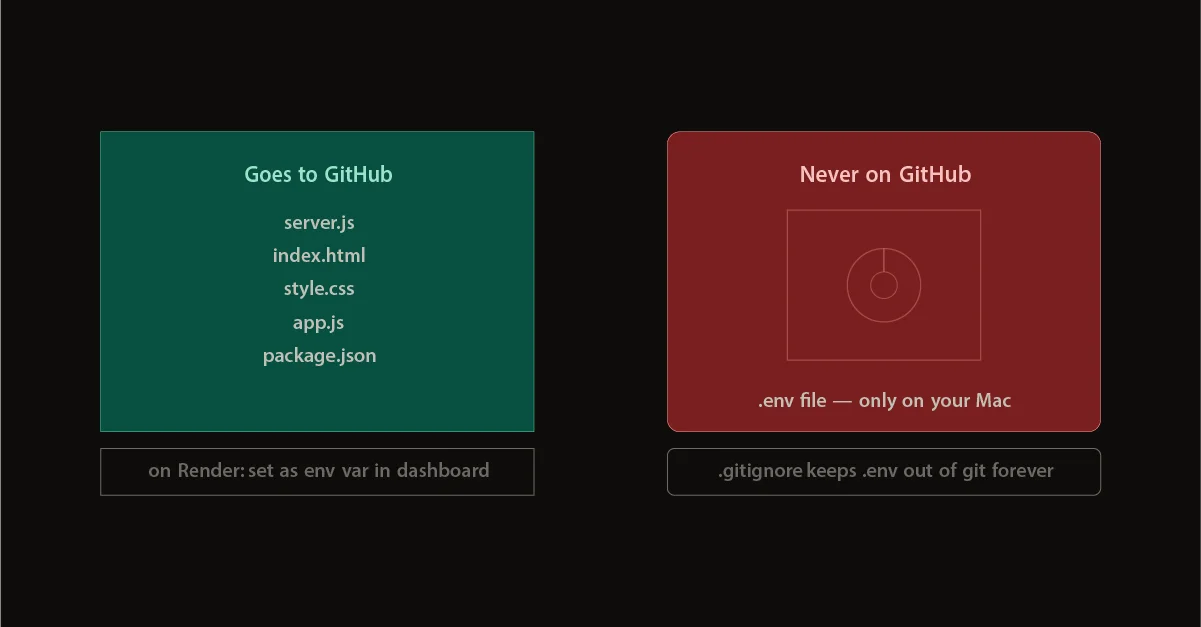
The rule is absolute: the key never leaves the back room. Not in the code. Not on GitHub. Not in the browser's network inspector. It lives only in the server's environment, set once in the hosting dashboard. Once that landed, the rest was just execution.
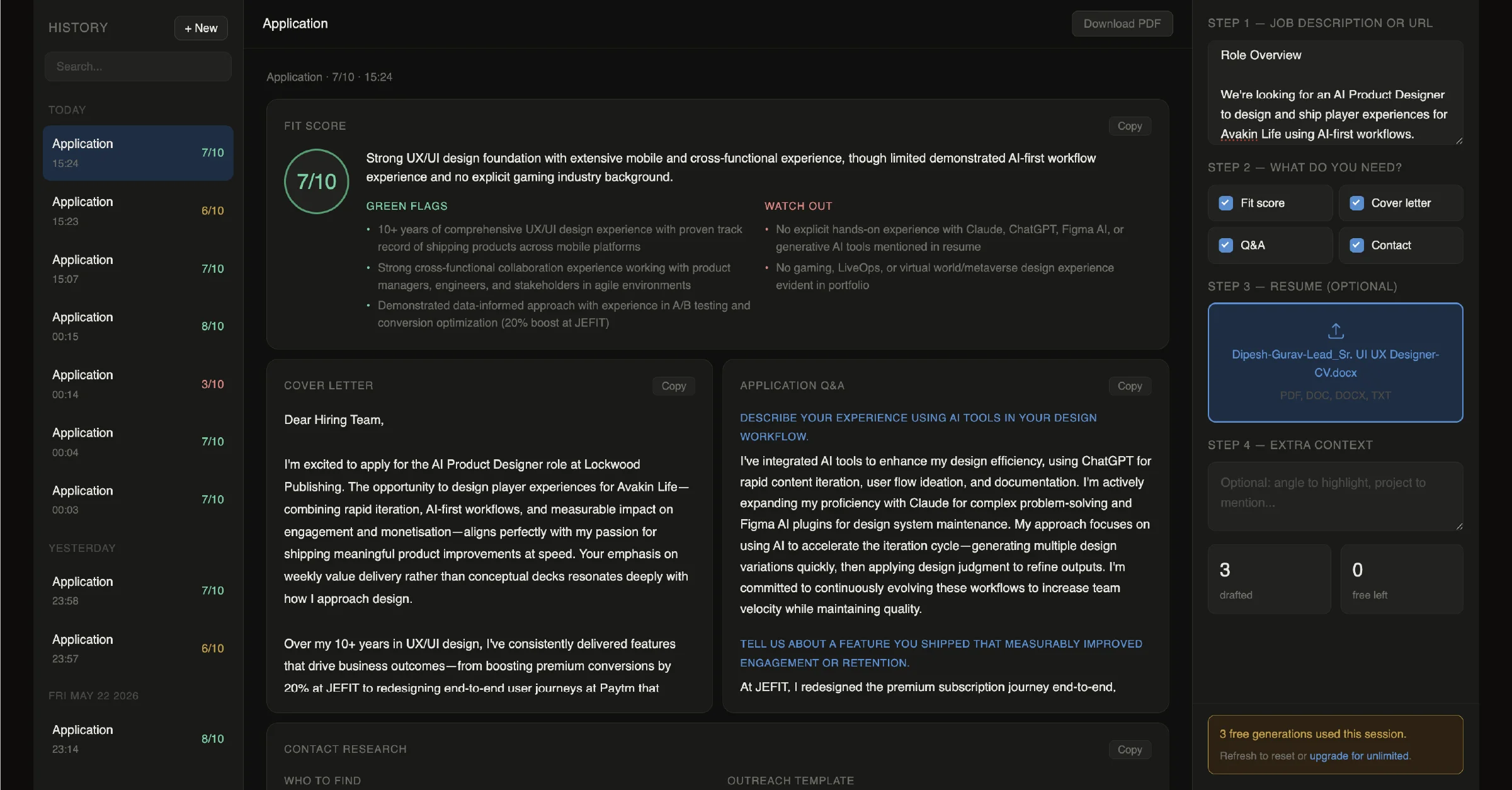
A job application assistant. Genuinely useful, genuinely shipped.
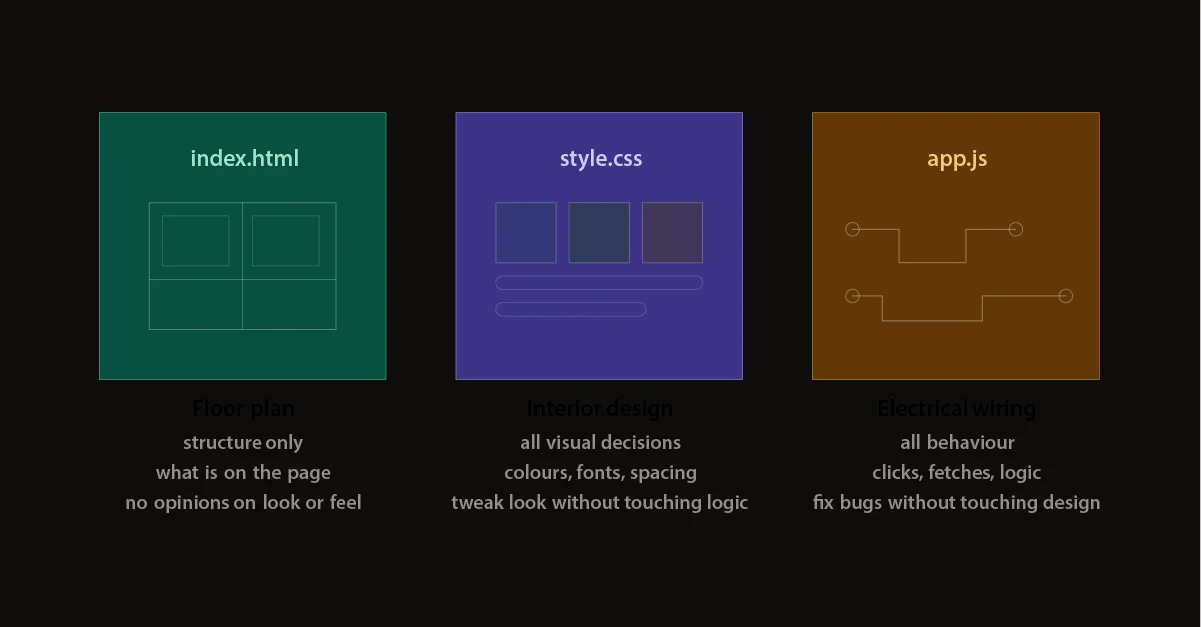
Paste a job description, upload your resume, select what you need (cover letter, fit score with honest flags, Q&A answers, contact outreach template) and get a full application package back in seconds. Four files. Three separate concerns.
Floor plan
Structure only. No opinions on look or behaviour: rooms and walls, nothing decorative.
Interior design
Every visual decision. The dark surface system, the score circle that turns green, amber, or red. Change the look without touching the logic.
Electrical wiring
All behaviour. Click events, progress bar animation, localStorage history, bento grid rendering. Fix a bug without touching the design.
The back room
Runs on the server. Holds the key, calls Anthropic, returns structured JSON. The browser never speaks to Anthropic directly.
Design decides first. Code follows.
The code executes intent. The intent is always a design decision first.
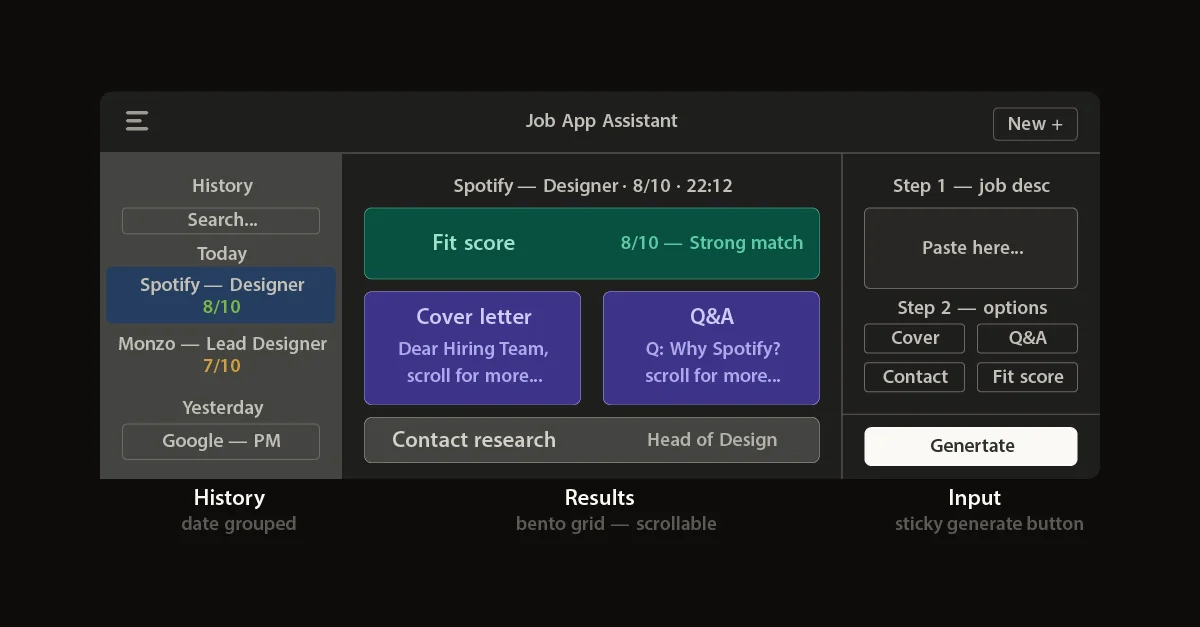
Sticky generate button
The input form is long: job description, checkboxes, resume upload, extra context. If the primary CTA scrolled away, users would have to hunt for it at exactly the moment they're ready to act. Pinning it to the bottom of the panel is a UX principle, not a code problem. Once the decision was made, the CSS was one property.
Three-panel layout
History on the left. Results in the centre. Input on the right. This is the same shell as Claude, ChatGPT, and Gemini, interfaces people use every day. The mental model arrives pre-loaded. Learning curve: near zero.
Bento grid results
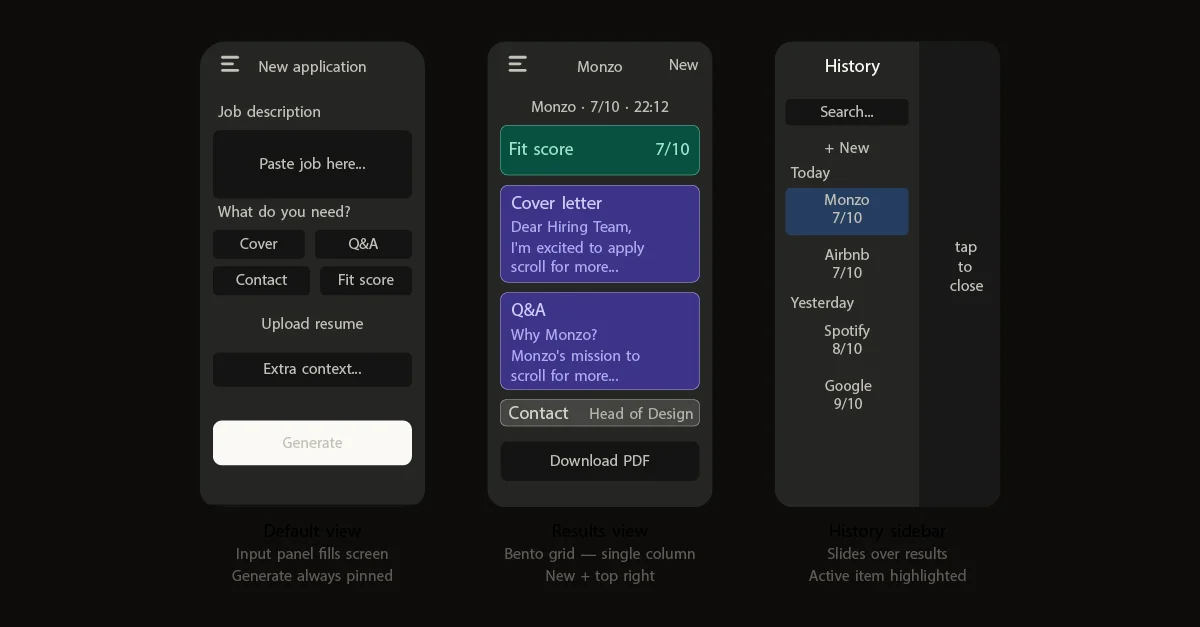
A wall of text is the wrong answer for dense AI output. Results render as distinct tiles: fit score with a score circle, cover letter and Q&A side by side on desktop and stacked on mobile, contact research spanning the full width. Each tile has its own copy button. Information design, not decoration.
Mobile sheet behaviour
On mobile, the input panel slides up as a bottom sheet. A floating close button sits above it (circular, bordered, fixed), visible at all times. The generate button stays pinned at the bottom of the viewport in every state. These decisions reduce the cognitive distance between intent and action.
From code on a laptop to a URL you can share.
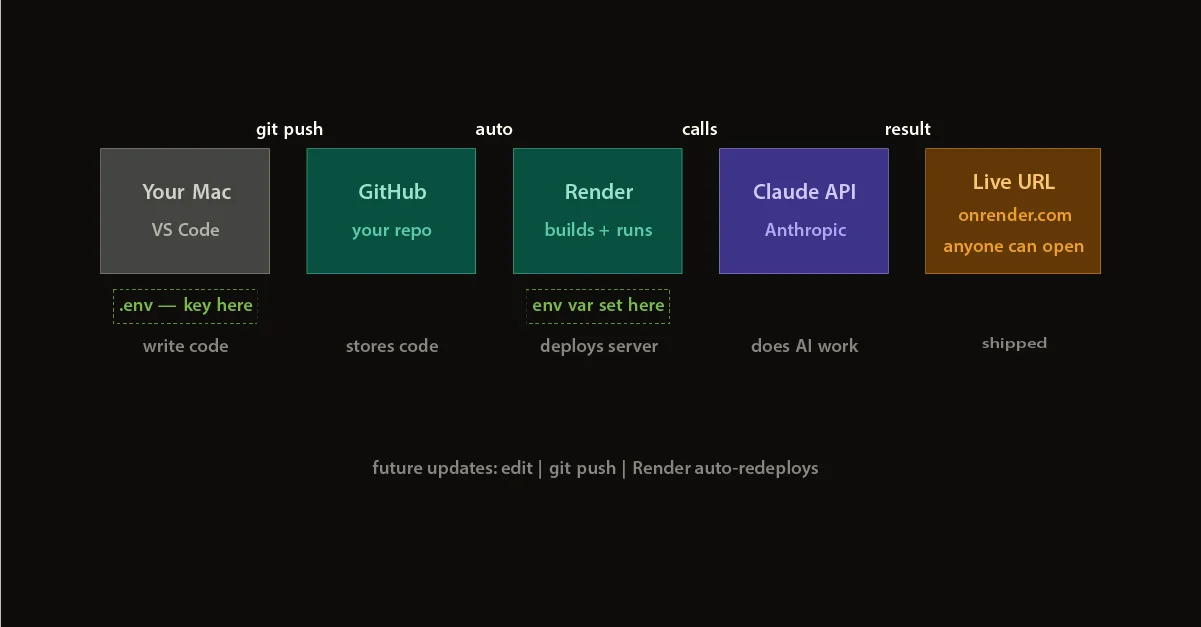
The deployment loop, once understood, is almost embarrassingly simple. Write code locally. The API key lives in a .env file that never gets committed; .gitignore makes that permanent. Push to GitHub. Render watches the repository and redeploys automatically. The API key is set once in Render's dashboard, read at runtime, never visible in the codebase.
Every future update is three commands: git add . → git commit → git push. Render handles the rest in under two minutes.
A working product. And a mental model that won't leave.
The app is live at job-app-assistant.onrender.com. It generates cover letters, fit scores, Q&A answers, and contact outreach templates: all structured, all copyable, all downloadable as PDF.
But the more durable outcome is the picture in my head. I now know what the back room looks like. I know where the key lives, why it matters, what each file owns and why that separation is worth defending. I know the difference between a concept that lives in a deck and a product that lives on a server.
For a designer who works at the intersection of human judgement and AI tools, that picture changes what's possible.
"The code executes the intent. The intent is always a design decision first."